Building Databricks Medallion Pipelines with DynamoDB – Part 4: Complete Event-Driven Workflow Orchestration

In Parts 1–3, you learned the architectural concepts and transformation logic for Bronze, Silver, and Gold layers, but the orchestration glue that ties them together into a production streaming pipeline deserves its own deep dive.
This article shows:
- A complete Databricks Workflow JSON configuration linking Bronze → Silver → Gold.
- How file arrival triggers, table update triggers, and dependencies create an event-driven DAG.
- Python code for accessing trigger context (commit versions, updated tables).
- Monitoring and observability patterns for multi-stage workflows.
- How to deploy and manage workflows via Databricks CLI/API.
Event-driven orchestration overview
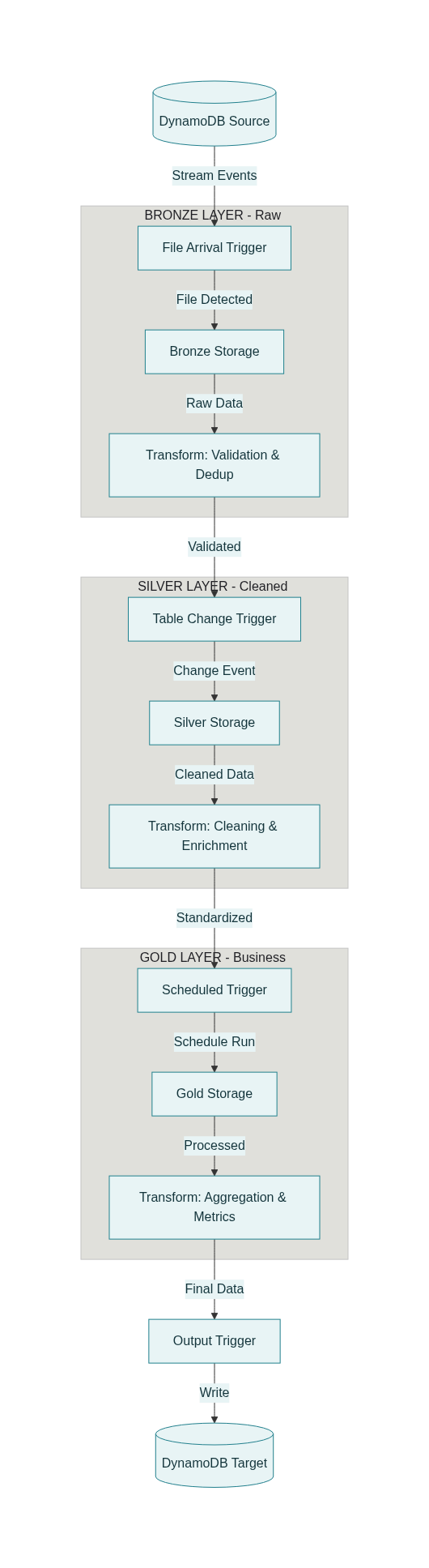
A production Medallion pipeline should react to data events, not just time-based schedules:
- New DynamoDB export lands in S3 → Bronze ingestion starts automatically.
- Bronze table commits new data → Silver transformation starts.
- Silver table updates → Gold aggregation runs.
- Gold completes → Metrics are published to DynamoDB for serving.
This creates a loosely coupled, event-driven DAG where each stage only runs when upstream data changes, minimizing wasted compute and reducing end-to-end latency.
Complete workflow configuration
Below is a full Databricks Workflow JSON that implements the Bronze → Silver → Gold → DynamoDB pattern with event triggers.
1
2
3
4
5
6
7
8
9
10
11
12
13
14
15
16
17
18
19
20
21
22
23
24
25
26
27
28
29
30
31
32
33
34
35
36
37
38
39
40
41
42
43
44
45
46
47
48
49
50
51
52
53
54
55
56
57
58
59
60
61
62
63
64
65
66
67
68
69
70
71
72
73
74
75
76
77
78
79
80
81
82
83
84
85
86
87
88
89
90
91
92
93
94
95
96
97
98
99
100
101
102
103
104
105
106
107
108
109
110
111
112
113
114
115
116
117
118
119
120
121
122
123
124
125
126
127
128
129
130
131
132
133
134
135
136
137
138
139
140
141
142
143
144
145
146
147
148
149
150
151
152
153
154
155
156
157
158
159
160
161
162
163
164
165
166
167
168
169
170
171
172
173
174
175
176
177
178
179
180
181
182
183
184
185
186
187
188
189
190
191
192
193
194
195
196
197
198
199
200
201
202
203
204
205
206
207
208
209
210
211
212
213
214
215
216
217
218
219
220
221
222
223
224
225
226
227
228
229
230
231
232
233
{
  "name": "medallion_dynamodb_pipeline",
  "description": "Event-driven Bronze→Silver→Gold pipeline with DynamoDB source and target",
  "max_concurrent_runs": 3,
  "timeout_seconds": 0,
  "email_notifications": {
    "on_success": ["data-team@company.com"],
    "on_failure": ["data-ops@company.com", "oncall@company.com"],
    "no_alert_for_skipped_runs": false
  },

  "tasks": [
    {
      "task_key": "bronze_ingest_transactions",
      "description": "Ingest new DynamoDB exports from S3 into Bronze layer",

      "notebook_task": {
        "notebook_path": "/Repos/production/etl-pipelines/bronze/01_ingest_transactions",
        "base_parameters": {
          "source_table": "customer_transactions",
          "bronze_path": "s3a://my-data-lake/bronze/customer_transactions"
        }
      },

      "new_cluster": {
        "spark_version": "14.3.x-scala2.12",
        "node_type_id": "i3.xlarge",
        "num_workers": 3,
        "spark_conf": {
          "spark.databricks.delta.preview.enabled": "true",
          "spark.databricks.delta.properties.defaults.autoOptimize.optimizeWrite": "true"
        },
        "aws_attributes": {
          "availability": "ON_DEMAND",
          "instance_profile_arn": "arn:aws:iam::123456789:instance-profile/databricks-s3-access"
        }
      },

      "timeout_seconds": 3600,
      "max_retries": 2,
      "retry_on_timeout": true,

      "trigger": {
        "file_arrival": {
          "url": "s3a://raw-dynamodb-exports/customer_transactions/",
          "min_time_between_triggers_seconds": 300,
          "wait_after_last_change_seconds": 60
        }
      }
    },

    {
      "task_key": "silver_transform_transactions",
      "description": "Apply validation, cleaning, and enrichment to create Silver layer",
      "depends_on": [
        {
          "task_key": "bronze_ingest_transactions"
        }
      ],

      "notebook_task": {
        "notebook_path": "/Repos/production/etl-pipelines/silver/02_transform_transactions",
        "base_parameters": {
          "bronze_table": "catalog.bronze.customer_transactions",
          "silver_path": "s3a://my-data-lake/silver/customer_transactions",
          "quality_threshold": "0.98"
        }
      },

      "job_cluster_key": "shared_cluster",

      "timeout_seconds": 3600,
      "max_retries": 1,

      "trigger": {
        "table_update": {
          "table_names": ["catalog.bronze.customer_transactions"],
          "min_time_between_triggers_seconds": 300,
          "wait_after_last_change_seconds": 120
        }
      },

      "health": {
        "rules": [
          {
            "metric": "RUN_DURATION_SECONDS",
            "op": "GREATER_THAN",
            "value": 7200
          }
        ]
      }
    },

    {
      "task_key": "silver_enrich_customers",
      "description": "Join transactions with customer dimension for enrichment",
      "depends_on": [
        {
          "task_key": "silver_transform_transactions"
        }
      ],

      "notebook_task": {
        "notebook_path": "/Repos/production/etl-pipelines/silver/03_enrich_with_dimensions",
        "base_parameters": {
          "transactions_table": "catalog.silver.customer_transactions",
          "customers_dim": "catalog.dimensions.customers"
        }
      },

      "job_cluster_key": "shared_cluster",
      "timeout_seconds": 1800,
      "max_retries": 1
    },

    {
      "task_key": "gold_daily_sales_summary",
      "description": "Aggregate Silver data into daily sales metrics",
      "depends_on": [
        {
          "task_key": "silver_enrich_customers"
        }
      ],

      "notebook_task": {
        "notebook_path": "/Repos/production/etl-pipelines/gold/04_daily_sales_summary",
        "base_parameters": {
          "silver_table": "catalog.silver.customer_transactions",
          "gold_path": "s3a://my-data-lake/gold/daily_sales_summary"
        }
      },

      "job_cluster_key": "shared_cluster",
      "timeout_seconds": 7200,
      "max_retries": 1,

      "trigger": {
        "periodic": {
          "interval": 1,
          "unit": "DAYS"
        }
      }
    },

    {
      "task_key": "gold_customer_ltv",
      "description": "Calculate customer lifetime value metrics",
      "depends_on": [
        {
          "task_key": "silver_enrich_customers"
        }
      ],

      "notebook_task": {
        "notebook_path": "/Repos/production/etl-pipelines/gold/05_customer_ltv",
        "base_parameters": {
          "silver_table": "catalog.silver.customer_transactions",
          "gold_path": "s3a://my-data-lake/gold/customer_metrics"
        }
      },

      "job_cluster_key": "shared_cluster",
      "timeout_seconds": 3600,
      "max_retries": 1
    },

    {
      "task_key": "publish_to_dynamodb",
      "description": "Write Gold metrics back to DynamoDB for API serving",
      "depends_on": [
        {
          "task_key": "gold_daily_sales_summary"
        },
        {
          "task_key": "gold_customer_ltv"
        }
      ],

      "notebook_task": {
        "notebook_path": "/Repos/production/etl-pipelines/serving/06_publish_dynamodb",
        "base_parameters": {
          "sales_summary_path": "s3a://my-data-lake/gold/daily_sales_summary",
          "customer_ltv_path": "s3a://my-data-lake/gold/customer_metrics",
          "dynamodb_sales_table": "daily_sales_metrics",
          "dynamodb_customer_table": "customer_ltv_metrics",
          "target_wcu": "500"
        }
      },

      "new_cluster": {
        "spark_version": "14.3.x-scala2.12",
        "node_type_id": "i3.2xlarge",
        "num_workers": 5,
        "aws_attributes": {
          "availability": "ON_DEMAND",
          "instance_profile_arn": "arn:aws:iam::123456789:instance-profile/databricks-dynamodb-write"
        }
      },

      "timeout_seconds": 3600,
      "max_retries": 2
    }
  ],

  "job_clusters": [
    {
      "job_cluster_key": "shared_cluster",
      "new_cluster": {
        "spark_version": "14.3.x-scala2.12",
        "node_type_id": "i3.xlarge",
        "num_workers": 4,
        "autoscale": {
          "min_workers": 2,
          "max_workers": 8
        },
        "spark_conf": {
          "spark.databricks.delta.optimizeWrite.enabled": "true",
          "spark.databricks.delta.autoCompact.enabled": "true"
        },
        "aws_attributes": {
          "availability": "SPOT_WITH_FALLBACK",
          "instance_profile_arn": "arn:aws:iam::123456789:instance-profile/databricks-s3-access"
        }
      }
    }
  ],

  "schedule": {
    "quartz_cron_expression": "0 0 1 * * ?",
    "timezone_id": "America/Los_Angeles",
    "pause_status": "UNPAUSED"
  }
}
3. Understanding the workflow structure
Task dependencies and triggers
Task: bronze_ingest_transactions
- Trigger: File arrival on S3 path
s3a://raw-dynamodb-exports/customer_transactions/ - What it does: Runs notebook
01_ingest_transactionswhich reads new DynamoDB exports and writes to Bronze Delta table - Cluster: New dedicated cluster (fast startup for event-driven ingestion)
- Parameters: Source table name, target Bronze path
Task: silver_transform_transactions
- Depends on:
bronze_ingest_transactions(runs after Bronze completes) - Trigger: Table update on
catalog.bronze.customer_transactions - What it does: Applies validation rules, cleaning, type casting from Part 2
- Cluster: Shared job cluster (cost-efficient for multi-stage processing)
- Health check: Alerts if runtime exceeds 2 hours
Task: silver_enrich_customers
- Depends on:
silver_transform_transactions - What it does: Joins with customer dimension table for enrichment
- No explicit trigger: Runs immediately when dependency completes
Task: gold_daily_sales_summary
- Depends on:
silver_enrich_customers - Trigger: Periodic (daily at 1 AM) OR when Silver updates
- What it does: Aggregates transactions into daily sales metrics by category/segment/region
Task: gold_customer_ltv
- Depends on:
silver_enrich_customers - What it does: Calculates customer lifetime value, frequency, recency metrics
- Runs in parallel with
gold_daily_sales_summary
Task: publish_to_dynamodb
- Depends on: Both Gold tasks completing
- What it does: Writes Gold Delta tables back to DynamoDB for API serving
- Cluster: Larger dedicated cluster with DynamoDB write permissions
Trigger types explained
| Trigger | Configuration | When it fires | Best for |
|---|---|---|---|
| File arrival | url, min_time_between_triggers_seconds, wait_after_last_change_seconds | New files detected in S3 path | Bronze ingestion from exports |
| Table update | table_names, min_time_between_triggers_seconds, wait_after_last_change_seconds | Delta table commits (INSERT/MERGE/DELETE) | Silver and Gold reactive processing |
| Periodic | interval, unit (HOURS/DAYS) | Fixed schedule | Daily/hourly aggregations |
| Dependency | depends_on | When upstream task completes | Sequential processing |
Accessing trigger context in notebooks
When a task is triggered by file arrival or table update, Databricks exposes context via job parameters.
File arrival context
In the Bronze ingestion notebook:
1
2
3
4
5
6
7
8
9
10
11
12
13
14
15
16
17
18
19
20
import json

# Access file arrival trigger information
try:
    # Get the list of new files that triggered this run
    trigger_info = dbutils.widgets.get("")
    new_files = json.loads(trigger_info)

    print(f"Processing {len(new_files)} new files:")
    for file_path in new_files:
        print(f"  - {file_path}")

    # Process only the new files (incremental ingestion)
    for file_path in new_files:
        df = spark.read.format("parquet").load(file_path)
        # Add to Bronze...

except Exception as e:
    print("No file arrival context; running full ingestion")
    # Fallback to processing entire directory
Table update context
In the Silver transformation notebook:
1
2
3
4
5
6
7
8
9
10
11
12
13
14
15
16
17
18
19
20
21
22
# Access table update trigger information
try:
    updated_tables = dbutils.widgets.get("")
    print(f"Triggered by updates to: {updated_tables}")

    # Get specific commit version for exactly-once processing
    bronze_version = dbutils.widgets.get(
        ""
    )
    print(f"Processing Bronze commit version: {bronze_version}")

    # Read specific version for incremental processing
    bronze_df = spark.read \
        .format("delta") \
        .option("versionAsOf", bronze_version) \
        .table("catalog.bronze.customer_transactions")

    # Apply Silver transformations...

except Exception as e:
    print("No table update context; processing latest Bronze data")
    bronze_df = spark.read.table("catalog.bronze.customer_transactions")
This enables exactly-once semantics: each Silver run processes a specific Bronze commit version, avoiding duplicate processing or missed records.
Deploying and managing workflows
Deploy via Databricks CLI
1
2
3
4
5
6
7
8
9
10
# Install Databricks CLI
pip install databricks-cli

# Configure authentication
databricks configure --token

# Create the workflow
databricks jobs create --json-file medallion_workflow.json

# Output: {"job_id": 12345}
Update existing workflow
1
2
# Update workflow definition
databricks jobs reset --job-id 12345 --json-file medallion_workflow_v2.json
Trigger manually (for testing)
1
2
3
4
5
6
# Trigger a one-time run
databricks jobs run-now --job-id 12345

# Trigger with custom parameters
databricks jobs run-now --job-id 12345 \
  --notebook-params '{"source_table": "test_transactions"}'
Python SDK example
1
2
3
4
5
6
7
8
9
10
11
12
13
14
15
16
17
18
19
20
21
22
23
24
25
26
27
28
29
30
31
32
33
34
35
from databricks.sdk import WorkspaceClient
import json

client = WorkspaceClient()

# Load workflow configuration
with open("medallion_workflow.json") as f:
    workflow_config = json.load(f)

# Create workflow
response = client.jobs.create(**workflow_config)
job_id = response.job_id

print(f"✓ Workflow created with Job ID: {job_id}")

# Trigger workflow
run_response = client.jobs.run_now(job_id=job_id)
run_id = run_response.run_id

print(f"✓ Workflow triggered with Run ID: {run_id}")

# Monitor run status
import time
while True:
    run = client.jobs.get_run(run_id)
    state = run.state.life_cycle_state

    print(f"Run state: {state}")

    if state in ["TERMINATED", "SKIPPED", "INTERNAL_ERROR"]:
        result = run.state.result_state
        print(f"Final result: {result}")
        break

    time.sleep(30)
Monitoring and observability
Built-in job monitoring
Databricks provides:
- Run history: view all executions, durations, and outcomes
- Task-level logs: stdout/stderr from each notebook
- Lineage tracking: see which tables were read/written by each task
- Health rules: alert when tasks exceed duration or memory thresholds
Custom metrics table
Extend the workflow with a metrics collection task:
1
2
3
4
5
6
7
8
9
10
11
12
13
14
15
16
17
18
19
20
21
22
23
24
25
26
27
28
29
30
31
# In each task notebook, log metrics
from datetime import datetime

def log_task_metrics(stage, input_count, output_count, duration_sec, quality_score):
    metrics_row = {
        "pipeline_run_id": dbutils.widgets.get("run_id"),
        "stage": stage,
        "timestamp": datetime.now(),
        "records_input": input_count,
        "records_output": output_count,
        "duration_seconds": duration_sec,
        "quality_score": quality_score
    }

    spark.createDataFrame([metrics_row]).write \
        .format("delta") \
        .mode("append") \
        .saveAsTable("catalog.metrics.pipeline_runs")

# Usage in Silver task
start_time = datetime.now()
# ... perform Silver transformation ...
duration = (datetime.now() - start_time).total_seconds()

log_task_metrics(
    stage="silver",
    input_count=bronze_df.count(),
    output_count=silver_df.count(),
    duration_sec=duration,
    quality_score=0.985
)
Alerting on quality degradation
Query the metrics table to detect issues:
1
2
3
4
5
6
7
8
9
-- Alert if Silver quality drops below threshold
SELECT
    stage,
    AVG(quality_score) as avg_quality,
    COUNT(*) as run_count
FROM catalog.metrics.pipeline_runs
WHERE timestamp >= CURRENT_DATE() - INTERVAL 7 DAYS
GROUP BY stage
HAVING AVG(quality_score) < 0.98
Set up SQL alerts in Databricks SQL to email/Slack when this query returns rows.
Complete end-to-end flow diagram
Here’s how the complete workflow executes:
graph TD
    A[DynamoDB Export to S3] -->|File Arrival Trigger| B[Bronze Ingest Task]
    B -->|Writes to| C[Bronze Delta Table]
    C -->|Table Update Trigger| D[Silver Transform Task]
    D -->|Writes to| E[Silver Delta Table]
    E --> F[Silver Enrich Task]
    F -->|Writes to| G[Enriched Silver Table]
    G -->|Daily Schedule| H[Gold Daily Sales Task]
    G --> I[Gold Customer LTV Task]
    H -->|Writes to| J[Gold Sales Delta]
    I -->|Writes to| K[Gold LTV Delta]
    J --> L[Publish to DynamoDB Task]
    K --> L
    L -->|Writes to| M[DynamoDB Serving Tables]
Timeline example:
1
2
3
4
5
6
7
8
14:30 - New DynamoDB export lands in S3
14:31 - File arrival trigger fires → Bronze ingestion starts
14:35 - Bronze writes commit → Table update trigger fires → Silver starts
14:42 - Silver writes commit → Enrichment task starts immediately
14:48 - Enrichment completes, waits for daily schedule
01:00 (next day) - Daily schedule fires → Gold tasks start in parallel
01:15 - Both Gold tasks complete → DynamoDB publish starts
01:25 - DynamoDB publish completes → Metrics available to APIs
Summary
This Part 4 filled the orchestration gap by showing:
- A complete Databricks Workflow JSON with 6 tasks spanning Bronze → Silver → Gold → DynamoDB.
- How file arrival triggers detect new S3 exports and start Bronze ingestion automatically.
- How table update triggers make Silver and Gold reactive to upstream changes.
- How to access trigger context in notebooks for incremental, exactly-once processing.
- How to deploy workflows via CLI/API and monitor them with built-in and custom metrics.
Combined with Parts 1–3, you now have a complete, production-ready blueprint for building event-driven Medallion pipelines that integrate DynamoDB with Databricks, handle streaming data, enforce data quality, and serve both analytical and operational use cases.